




A New Digital Banking Experience Coming November 3, 2026
Banking that fits your life — anytime, anywhereIt’s your Advantage
Digital Banking Upgrade Center
We’re excited to introduce a new Digital Banking experience launching on Tuesday, November 3, 2026. The upgraded platform will feature a modern design, improved navigation, enhanced security, and new tools to help you manage your finances with ease.
As part of the upgrade, Online and Mobile Banking will be temporarily unavailable on Monday, November 2. In addition, External Transfers will become unavailable beginning Friday, October 30. BillPay and Zelle access will be unavailable on Monday, November 2. Please refer to the FAQs below for service-specific timelines and additional details.
Debit cards, ATMs, and Phone Banking will remain available and continue to operate as normal throughout the upgrade.
Our goal is to deliver a more intuitive, secure, and seamless banking experience that makes it easier for you to access your accounts, move money, manage cards, monitor activity, and stay connected to your finances anytime, anywhere.
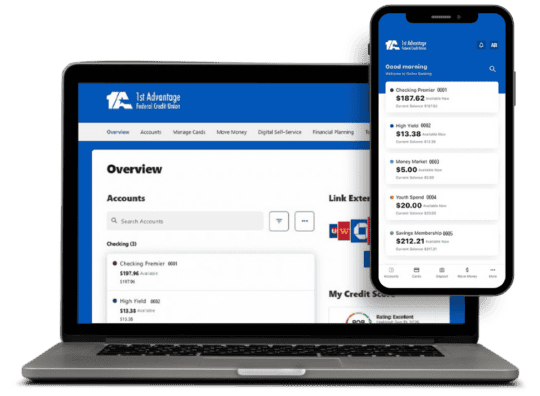
New Features
This new experience will offer all the features you’ve come to expect, plus a variety of exciting enhancements we’re eager to share with you!
Consistent Experience Across All Devices
Whether you’re on your phone, tablet, or computer, you’ll enjoy a seamless experience with the same features and functionality wherever you log in.
Enhanced Account Alerts & Notifications
Stay connected to your finances with real-time alerts that help you monitor account activity and stay informed.
Improved Money Movement Tools
Moving money will be easier than ever with expanded transfer capabilities.
Financial Wellness Tools
Gain valuable insights into your spending habits and financial health.
Easier Access to Your Full Financial Picture
Connect eligible accounts from other financial institutions to see more of your finances in one place.
Enhanced Security
Protecting your financial information remains our top priority.
Convenience
Manage more of your banking with convenient self-service tools.
What You’ll Need Before Your First Login
When you access the new Digital Banking platform for the first time, please have the following ready:
- Your current User ID
Your User ID will not change. We recommend writing it down before the upgrade if you don’t have it memorized. - Access to your phone or email
You’ll be asked to verify your identity using the contact information on file. If your phone number has changed, please update it before the conversion. - A password that meets security requirements
For security purposes, you’ll create a password the first time you sign in that is at least 16 characters and no more than 32 characters in length. It must contain at least one uppercase letter, one lowercase letter, one number, and one special character, such as $,# or @. It can be the same as your existing password if it meets the new password security requirements. - The latest version of our Mobile App
Mobile users will not need to download a new app, but you should update your existing app to the latest version before logging in. If you use Digital Banking through a web browser, no action is required. The login page will automatically be updated to the new platform. - A few minutes to personalize your settings
After logging in, you may need to:
Re-enable any biometrics such as Face ID
Reconnect external accounts used for transfers
Re-add any manually added cards in My Cards
Recreate custom account or card alerts
About the Upgrade FAQs
Our new digital banking platform will launch on Tuesday, November 3, 2026.
We’re upgrading to deliver a better digital banking experience. The new platform features improved navigation, a modern design, enhanced security, and new tools to help you manage your finances more efficiently.
Yes. Online and mobile banking will be temporarily unavailable during the upgrade period. Existing Online and Mobile Banking will be unavailable as of midnight on Sunday, November 1. Additionally, new Online and Mobile Banking enrollments will be unavailable beginning Friday, October 30 at 8 a.m.
Getting Started FAQs
No. You will continue using your current User ID. During your first login, you’ll verify your identity and create a new password. We recommend writing down your current User ID before the upgrade.
Your User ID will stay the same. For security purposes, you will be required to create a password the first time you log in to the new platform. It can be the same as your existing password as long as it meets the new password security requirements.
Your password in the new system needs to be at least 16 characters and no more than 32 characters in length. It must contain at least one uppercase letter, one lowercase letter, one number, and one special character, such as $,# or @. It can be the same as your existing password if it meets the new password security requirements.
No. You will not need to download a new app, but you will need to update your existing app to the latest version once it becomes available.
We recommend updating your phone number now before the upgrade.
You can update your information:
- In Mobile Banking under More > Manage Profile Information
- In Online Banking under Settings > Profile > Email and Phone Number
You may also contact us through Online Chat on our website at 1stAdvantage.org or by calling 757-877-2444 for assistance.
Most login issues can be resolved by selecting Forgot Password and completing a password reset. If you still need assistance, call 757-877-2444, use Online Chat, or visit a branch.
Your Accounts & Information FAQs
Your accounts and information will remain the same, but you’ll notice a refreshed design and improved navigation intended to make managing your finances easier.
Yes. Your transaction history and account information will be transferred to the new platform.
No. Your account numbers will remain the same.
No. Your statement format will remain the same, and historical statements will continue to be available. You will be prompted to enroll in eStatements regardless of your previous selection.
Cards & Card Management FAQs
Yes. Your debit card will continue to work normally throughout the conversion.
Yes. Card management features will remain available; however, any cards you manually added, and any custom card alerts will need to be set up again after the upgrade.
No, however, all standard security card alerts will transfer automatically. Custom card alerts will need to be recreated on the new platform.
Transfers, Payments & Deposits FAQs
Yes. Existing payees, scheduled payments, and recurring bill payments will be transferred automatically.
BillPay will be available on Wednesday, November 4 on the new Digital Banking system. Access to BillPay on our current platform will be unavailable as of Monday, November 2.
Previously scheduled payments will process as scheduled. However, you will not be able to make changes to any scheduled payments after Monday, November 2 until the new system is available Wednesday, November 4.
Yes. Internal scheduled and recurring transfers between your 1st Advantage accounts will continue as scheduled.
Automatic loan payments and transfers scheduled through Online or Mobile Banking will continue to process as scheduled. In the event of any delays related to the system upgrade, payments and transfers will be adjusted and posted according to your original requested date, so you won’t need to take any action.
Yes. Transfers and payments between your 1st Advantage accounts and loans will be transferred to the new platform.
No. External accounts, scheduled transfers, and payments established through 1st Advantage Online or Mobile Banking will not transfer. Existing items dated after Friday, October 30 will not be processed. After logging into the new platform, you’ll need to reconnect external accounts and recreate any scheduled transfers or payments.
Yes. Transfers that originate from another financial institution will continue to work normally because your account and routing numbers are not changing.
No. After the conversion, you’ll need to log in to Digital Banking to make loan payments. You can still make payments using an account from another financial institution.
Direct deposits received during the conversion period will be processed as normal and will not be affected.
Alerts & Notifications FAQs
Security account alerts will transfer automatically. Custom alerts, such as balance alerts and payment reminders, will need to be set up again on the new platform.
Alerts can be managed through Tools > Alerts, where you can customize notification preferences and delivery methods.
Mobile Banking Features FAQs
No. After your first login, you’ll need to re-enable biometric authentication on your device. Reminder, for your first login, you will need your existing User ID when completing this process.
No. Because you’ll be resetting your password during your first login, you’ll also need to re-enable saved password settings and biometric login on your device.
Other Services FAQs
Zelle® will remain available through Online and Mobile Banking until midnight on November 1. Zelle will then be unavailable as we transition to our new Digital Banking platform. Zelle® services will be restored and available on the new platform starting Wednesday, November 4.
Yes. ATMs will remain available throughout the conversion period.
Yes. Phone banking will continue to operate normally during the conversion.
Quicken functionality will continue to be supported in our new Digital Banking platform. However, Quicken access will be temporarily unavailable for approximately five business days after Monday, November 2. Once access is restored, your accounts may reconnect automatically, but some users may need to reauthorize or reestablish their connection within Quicken.
Security FAQs
Yes. The new platform includes enhanced security features such as multi-factor authentication, encryption, and fraud monitoring to help protect your information and accounts.